From spreadsheet to governed application
in three steps
Whether you start with an Excel file, a requirements document, or an existing solution, the path is the same: the business designs, AI Builder builds, and your platform governance applies from the first prompt.
Request a demo
How does cplace AI Builder work?
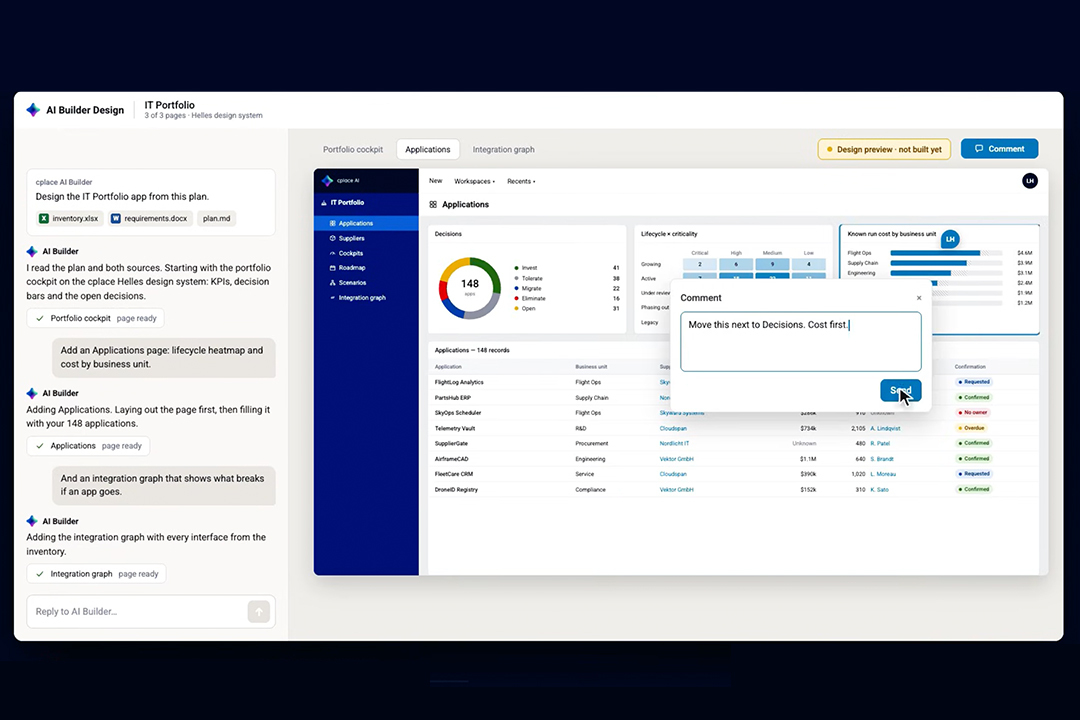
cplace AI Builder works in three steps. First, it turns your material into a clickable prototype of screens and data model that your team reviews. Second, it writes a build plan in plain sentences for your approval. Third, it builds the approved solution directly in your cplace workspace and tests every change. Nothing is built before your experts approve it.
What you can start with
AI Builder works with the material your teams already have. Clean requirements are not a prerequisite: AI Builder structures what you bring, and a cplace expert makes sure nothing important gets lost.
- Spreadsheets: The Excel file that runs a process today, with its columns, formulas, and workarounds.
- Requirements and documents: Requirements specifications, RFPs, process descriptions, or policies.
- Slides and workshop notes: The offsite deck, the whiteboard photo, or the notes from last week’s workshop.
- An existing cplace solution: A solution that’s already running and needs to be modernized or extended.

Three steps, two approvals
Every AI Builder project runs through the same three steps. Your team approves twice before anything is built.

Step 1: Prototype
AI Builder turns your material into screens and a data model first. Your team clicks through the prototype, discusses it with stakeholders, and asks for changes in plain language until it fits. The design is checked against cplace guardrails while you iterate, so what you approve can actually be built.
Your review: Does the prototype match how your teams work?

Step 2: Plan
Once the prototype is approved, AI Builder writes a build plan in plain sentences. It lists the types, workflows, layouts, and dashboards it will create or change, with no code to read.
Your review: Is this what should be built?

Step 3: Implement
AI Builder builds the approved solution in the cplace workspace you choose, usually staging, and tests every change along the way. Your team tests the result, a cplace expert verifies it, and cplace Solution Management promotes it to production.
The result: A working cplace solution with types, workflows, layouts, and dashboards, fully visible and editable in cplace.
The business designs.
AI Builder builds
Enterprises usually face a trade-off. Vibe coding is fast, but what it produces is hard to secure and maintain. Traditional implementation is solid, but it takes months before anyone sees a working screen.
AI Builder splits the work so you don’t have to choose. Domain experts shape the solution at the speed of vibe coding, in their own words and on screens they can click through. Once they approve the design, AI Builder takes over the build on the cplace platform, with the structure, permissions, and testing an enterprise application needs.
The people who know the process decide what gets built, on a platform designed to keep it running for years.
New solutions and
existing ones
New solutions (Greenfield)
AI Builder starts from your material and creates a new cplace solution from scratch, including its data model, workflows, layouts, and dashboards.
Existing solutions (Brownfield)
AI Builder works on a copy of your running cplace solution. Your team redesigns it in the prototype without touching what’s in production, tests ideas with key users, and approves the result. AI Builder then applies the approved changes to the live solution.

Why it works on cplace
AI Builder is fast because of what cplace already is. Three platform capabilities make the difference.
- A hybrid data model: In cplace, data models, workflows, and layouts are defined in the platform itself. Changing them doesn’t require database changes or software deployments, which is exactly what an AI builder needs.
- Live adaptability: What AI Builder creates is configuration inside cplace, not code that has to be compiled and deployed. Changes are live without a build, a deployment, or a restart. A staging environment is recommended, not required.
- The cplace MCP Server: The cplace MCP Server gives AI Builder more than 100 tools across data, data model, layouts, and automations. Everything a person can build in cplace, an agent can build, under the same permissions. For tailored views, AI Builder uses AI Widget Studio.

Four questions to ask before choosing an AI app builder
Generating an application is quickly becoming a commodity. What separates an enterprise-ready AI app builder is what happens around the generation. Here’s how cplace AI Builder answers the four questions enterprise buyers ask most often.

Governance: Who controls what gets built?
Your experts approve the prototype and the build plan before anything is built. Everything AI Builder creates inherits the existing roles, permissions, and audit trail. Organizations bring their own key, and cplace data is never used for AI model training.

Deployment: Where does it run, and how does it get there?
In your own cplace instance, with hosting and infrastructure already in place. Changes move from staging to production through cplace Solution Management, without a separate build or deployment pipeline.

Integration: How does it fit into our landscape?
What AI Builder builds sits on the same data model as the rest of your cplace solution. It connects to the systems around it through cplace’s REST APIs and the cplace MCP Server, so your teams’ AI clients can work with the same data.

Lifecycle: Who maintains it a year from now?
You do, with the tools you already have. The output is structured, versioned configuration in cplace’s no-code and low-code toolkit, visible and editable alongside everything built by hand. When requirements change, AI Builder extends the solution in the same governed way.

Frequently asked questions
A complete, governed application typically takes days or weeks instead of months, depending on its scope. Most of that time goes into the prototype to help your team decide what the solution should do.
No. Domain experts shape and approve the solution, AI Builder builds it, and a cplace expert verifies the result. The output is configuration in cplace’s No-Code and Low-Code toolkit, so your teams can maintain it without writing code.
Yes. AI Builder works on a copy of your running solution, so your team can redesign and test it without affecting production. Once the design is approved, AI Builder applies the changes to the live solution.
Yes. Exports, screenshots, and documentation from your current tool can serve as input for the prototype. Migrating the data itself is handled as a separate step once the new solution is approved.
AI Builder works with the AI provider your company already uses, through your own key. cplace recommends suitable models for planning and building and updates those recommendations as models evolve.
If a step fails, the build stops and puts the decision back in your hands. Nothing reaches production before your team has tested the result and a cplace expert has verified it.
It’s recommended, not required. As AI Builder writes configuration rather than code, changes are live without a build or deployment. Most teams still test in staging and promote to production through cplace Solution Management.